概要
手順
既存の puppet バージョン
素の squeeze の場合、apt-get で puppet をインストールすると...
# puppet --version
2.6.2
となる。ちなみに最新はというと...
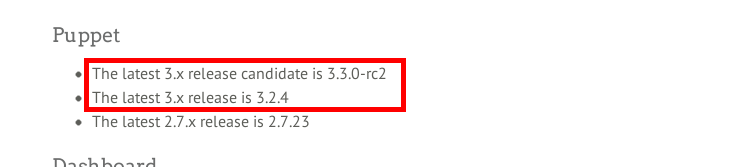
赤枠のようにバージョン 3 系が既にある。
リポジトリのインストール
ということで、こちらを参考にして、puppetlab からパッケージリポジトリをインストールする。
wget http://apt.puppetlabs.com/puppetlabs-release-squeeze.deb
dpkg -i puppetlabs-release-squeeze.deb
以下のようなメッセージが表示される。
Selecting previously deselected package puppetlabs-release.
(Reading database ... 26655 files and directories currently installed.)
Unpacking puppetlabs-release (from puppetlabs-release-squeeze.deb) ...
Setting up puppetlabs-release (1.0-7) ...
apt-get update
apt-get update
以下のようにパッケージリストが更新される。
Hit http://cdn.debian.net squeeze Release.gpg
Ign http://cdn.debian.net/debian/ squeeze/main Translation-en
Hit http://cdn.debian.net squeeze Release
Hit http://cdn.debian.net squeeze/main amd64 Packages
Get:1 http://apt.puppetlabs.com squeeze Release.gpg [836 B]
Ign http://apt.puppetlabs.com/ squeeze/dependencies Translation-en
Ign http://apt.puppetlabs.com/ squeeze/main Translation-en
Get:2 http://apt.puppetlabs.com squeeze Release [8877 B]
Ign http://apt.puppetlabs.com squeeze/main Sources
Ign http://apt.puppetlabs.com squeeze/dependencies Sources
Ign http://apt.puppetlabs.com squeeze/main amd64 Packages
Ign http://apt.puppetlabs.com squeeze/dependencies amd64 Packages
Get:3 http://apt.puppetlabs.com squeeze/main Sources [57.5 kB]
Get:4 http://apt.puppetlabs.com squeeze/dependencies Sources [8547 B]
Get:5 http://apt.puppetlabs.com squeeze/main amd64 Packages [57.1 kB]
Get:6 http://apt.puppetlabs.com squeeze/dependencies amd64 Packages [6177 B]
Fetched 139 kB in 1s (89.5 kB/s)
Reading package lists... Done
puppet のアップデート(最新のインストール)
apt-get install puppet
インストール後、バージョンが上がっていることを確認。
# puppet --version
3.2.4
か、かなりバージョンがアップしましたな。ちなみに、puppet apply の --help オプションは以下の通り。
# puppet apply --help

puppet-apply(8) -- Apply Puppet manifests locally
========

SYNOPSIS
--------
Applies a standalone Puppet manifest to the local system.


USAGE
-----
puppet apply [-h|--help] [-V|--version] [-d|--debug] [-v|--verbose]
  [-e|--execute] [--detailed-exitcodes] [-l|--logdest <file>] [--noop]
  [--catalog <catalog>] [--write-catalog-summary] <file>


DESCRIPTION
-----------
This is the standalone puppet execution tool; use it to apply
individual manifests.

When provided with a modulepath, via command line or config file, puppet
apply can effectively mimic the catalog that would be served by puppet
master with access to the same modules, although there are some subtle
differences. When combined with scheduling and an automated system for
pushing manifests, this can be used to implement a serverless Puppet
site.

Most users should use 'puppet agent' and 'puppet master' for site-wide
manifests.


OPTIONS
-------
Note that any configuration parameter that's valid in the configuration
file is also a valid long argument. For example, 'tags' is a
valid configuration parameter, so you can specify '--tags <class>,<tag>'
as an argument.

See the configuration file documentation at
http://docs.puppetlabs.com/references/stable/configuration.html for the
full list of acceptable parameters. A commented list of all
configuration options can also be generated by running puppet with
'--genconfig'.

* --debug:
  Enable full debugging.

* --detailed-exitcodes:
  Provide transaction information via exit codes. If this is enabled, an exit
  code of '2' means there were changes, an exit code of '4' means there were
  failures during the transaction, and an exit code of '6' means there were both
  changes and failures.

* --help:
  Print this help message

* --loadclasses:
  Load any stored classes. 'puppet agent' caches configured classes
  (usually at /etc/puppet/classes.txt), and setting this option causes
  all of those classes to be set in your puppet manifest.

* --logdest:
  Where to send messages. Choose between syslog, the console, and a log
  file. Defaults to sending messages to the console.

* --noop:
  Use 'noop' mode where Puppet runs in a no-op or dry-run mode. This
  is useful for seeing what changes Puppet will make without actually
  executing the changes.

* --execute:
  Execute a specific piece of Puppet code

* --verbose:
  Print extra information.

* --catalog:
  Apply a JSON catalog (such as one generated with 'puppet master --compile'). You can
  either specify a JSON file or pipe in JSON from standard input.

* --write-catalog-summary
  After compiling the catalog saves the resource list and classes list to the node
  in the state directory named classes.txt and resources.txt

EXAMPLE
-------
    $ puppet apply -l /tmp/manifest.log manifest.pp
    $ puppet apply --modulepath=/root/dev/modules -e "include ntpd::server"
    $ puppet apply --catalog catalog.json


AUTHOR
------
Luke Kanies


COPYRIGHT
---------
Copyright (c) 2011 Puppet Labs, LLC Licensed under the Apache 2.0 License
次回
- puppet apply を突っ込んで弄ってみる
